
The Distinction Between Scraping and Search Retrieval
Over the past eighteen months, thousands of corporate websites implemented blanket robots.txt disallow rules targeting artificial intelligence user agents. Driven by understandable concerns regarding intellectual property ingestion and uncompensated model training, engineering teams blocked bots like GPTBot, CCBot, and ClaudeBot at the root directory.
However, this defensive posture created an unintended casualty: complete erasure from generative answer engines. Major AI platforms operate distinct user-agents for model training versus live retrieval. When a user asks ChatGPT or Perplexity for commercial recommendations, the system deploys dedicated retrieval bots. If your robots.txt file blocks these retrieval agents, your business ceases to exist across conversational search results.
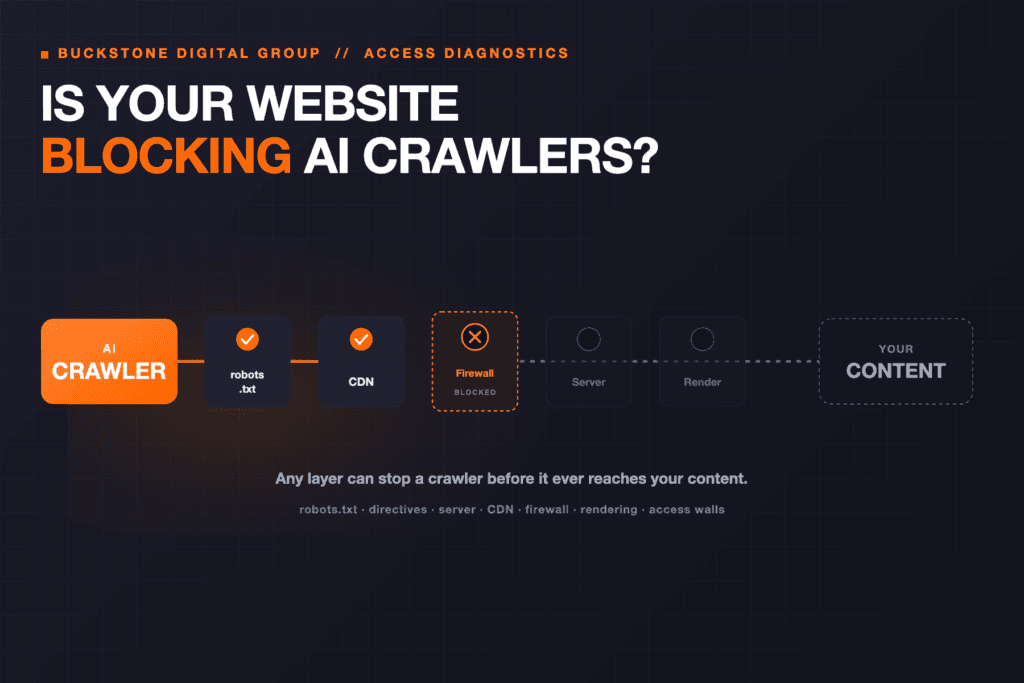
AI crawler access architecture
AI Crawler Taxonomy and Strategic Access Matrix
Formulating a rational crawler policy requires separating ingestion agents that train offline models from discovery agents that power live search citations.
| User Agent | Operator | Primary Function | Strategic Posture |
|---|---|---|---|
| OAI-SearchBot | OpenAI | Live web search for ChatGPT Search | Allow (Essential for AI discovery) |
| ChatGPT-User | OpenAI | Real-time user browsing navigation | Allow (Enables direct link click-through) |
| PerplexityBot | Perplexity AI | Web search and indexation for citations | Allow (Powers direct cited answers) |
| Claude-Web | Anthropic | Live web access within Claude chats | Allow (Commercial query grounding) |
| Google-Extended | Vertex AI & Gemini model training | Selective (Does not affect standard Google Search) | |
| GPTBot | OpenAI | Foundation model training corpus | Selective (Block if protecting raw content IP) |
| CCBot | Common Crawl | Public open-web dataset training | Block (Low commercial referral value) |
Step-by-Step Crawler Audit Protocol
Follow this structured procedure to determine whether your digital infrastructure is blocking search-critical AI user agents.
Root Robots.txt Inspection
Navigate directly to yourdomain.com/robots.txt and examine all Disallow rules. Verify whether wildcards (User-agent: * Disallow: /) or specific agent blocks suppress OAI-SearchBot or PerplexityBot.
Cloudflare & WAF Security Rules
Log into your Web Application Firewall (Cloudflare, AWS WAF, Fastly). Check if 'AI Scrapers and Crawlers' automated block rules are intercepting legitimate search bots with 403 Forbidden or challenge captchas.
Server Log User-Agent Verification
Inspect your access logs for recent requests from OAI-SearchBot IP ranges (published by OpenAI) to confirm requests return HTTP 200 rather than 401, 403, or 429 status codes.
Client-Side Rendering and Hydration Check
Validate that critical business information renders in the initial server-delivered HTML payload rather than relying on delayed client-side JavaScript execution.
Production-Ready Robots.txt Architecture
The following configuration establishes a balanced governance standard: it grants full indexing permissions to live search discovery engines while restricting wholesale training scrapers.
User-agent: OAI-SearchBot Allow: / User-agent: PerplexityBot Allow: / User-agent: Claude-Web Allow: / User-agent: GPTBot Disallow: / User-agent: CCBot Disallow: / Sitemap: https://getranked.pro/sitemap.xml
Applying this explicit policy ensures your public capabilities, service offerings, and strategic assets are indexed by answer engines without surrendering proprietary technical documentation to general training corpora.
Frequently Asked Questions About AI Crawlers
Answers to common technical questions regarding crawler permissions, search visibility, and server management.
Key Questions & Insights
No. GPTBot is used for offline model training. ChatGPT Search uses OAI-SearchBot for real-time web retrieval. Blocking GPTBot while allowing OAI-SearchBot keeps your content out of future training datasets while ensuring your business remains discoverable in live search responses.
Shen Li
AuthorSenior Search & AI Visibility Strategist at GetRanked. Specializing in technical SEO, Answer Engine Optimization (AEO), entity architecture, and search performance.
Explore GetRanked Services
Turn what you just read into compounding organic visibility, qualified buyer traffic, and revenue growth.
SEO Services
Full-funnel technical SEO, structured content architecture, and authority building designed to capture non-branded search demand.
Local SEO
Google Business Profile optimization, localized entity clarity, and geo-targeted authority to dominate high-intent local queries.
AEO & AI Search Visibility
Structured entity optimization, authoritative citations, and prompt engineering so your brand is recommended by ChatGPT and Google AI Overviews.
Web Design & Development
High-speed, conversion-focused Next.js websites engineered for Core Web Vitals, semantic schema, and seamless buyer experiences.